A win/loss agent reads the calls, CRM records and market context behind every closed deal, records why each one was won or lost in the buyer’s own words, and reports the patterns every week. To trust what it finds, define the deal population first, use only what was known at the time, keep buyer, seller and CRM reasons apart, and treat patterns as leads to investigate, not proof.
The loss reason in most CRMs is one pick from a dropdown, chosen by the rep after the deal is gone. The calls behind the deal usually tell a fuller story: what the buyer compared you to, which objection came up before things stalled, and what they said they needed.
A win/loss agent reads that evidence for every deal, not just the handful someone has time to review. Built carelessly, it can also be confidently wrong. This playbook covers how to build one your sales, product and marketing teams can act on.
Key takeaways
- Start with the deals, not the calls. Lost deals often have fewer recorded calls, which skews every count that follows.
- Use only what was known at the time. Final CRM fields leak the outcome into the analysis.
- Keep reasons apart by who gave them: what the buyer said, what the seller thinks and what the CRM records.
- Compare like with like, and report counts. A common reason isn’t automatically the cause.
- Keep people in the loop. Review the big findings, and run a few win/loss interviews to catch what calls miss.
What is a win/loss agent?
A win/loss agent organizes evidence about why opportunities progressed, stalled, were won or were lost.
It helps product marketing and sales leaders investigate patterns. It does not prove that a mentioned reason caused the outcome.
How do you build a win/loss agent in 6 steps?
Define the deals, join the evidence, tag the reasons, compare fairly, review with people, then keep it running.
The screens follow one example: a revenue operations lead asking why the team won and lost deals last quarter.
Step 1: Define which deals count
Define the eligible opportunities, outcome states, date rule, products, segments, regions, stages and exclusions. Resolve reopened, merged, duplicate, partner-led and no-decision opportunities.
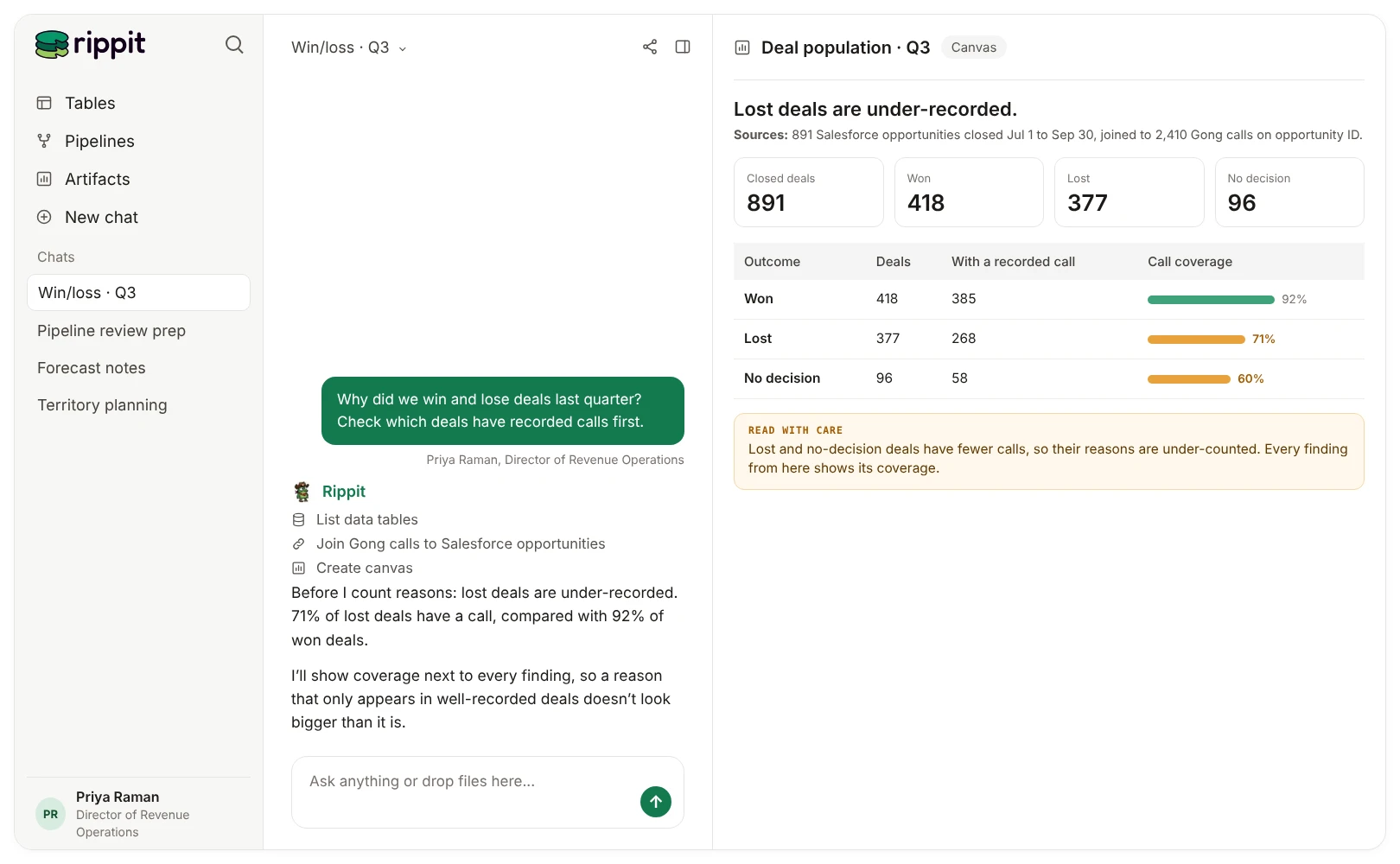
Measure conversation coverage. Lost deals often have fewer recorded calls or weaker CRM notes, creating systematic bias.
In Rippit: Connect Salesforce opportunities as a table alongside your call recorder, then check coverage before anything else:
Ask Rippit
How many deals that closed last quarter have at least one recorded call? Split it by won, lost and no decision.
Step 2: Join the evidence as it was known at the time
Link calls, notes and approved market context to the opportunity using stable identifiers. Preserve stage, amount, competitors, product, owner and account context as they were known at the observation time.
Do not use final CRM fields as if they were available earlier in the deal. That leaks the answer into the analysis.
In Rippit: A lookup joins each call to its opportunity on a shared ID, such as the account or opportunity ID, with no AI involved.
Step 3: Tag each reason by who gave it
Separate:
- explicit buyer-stated reason;
- seller or employee interpretation;
- observed behavior or event;
- CRM disposition;
- agent inference;
- approved public-market context.
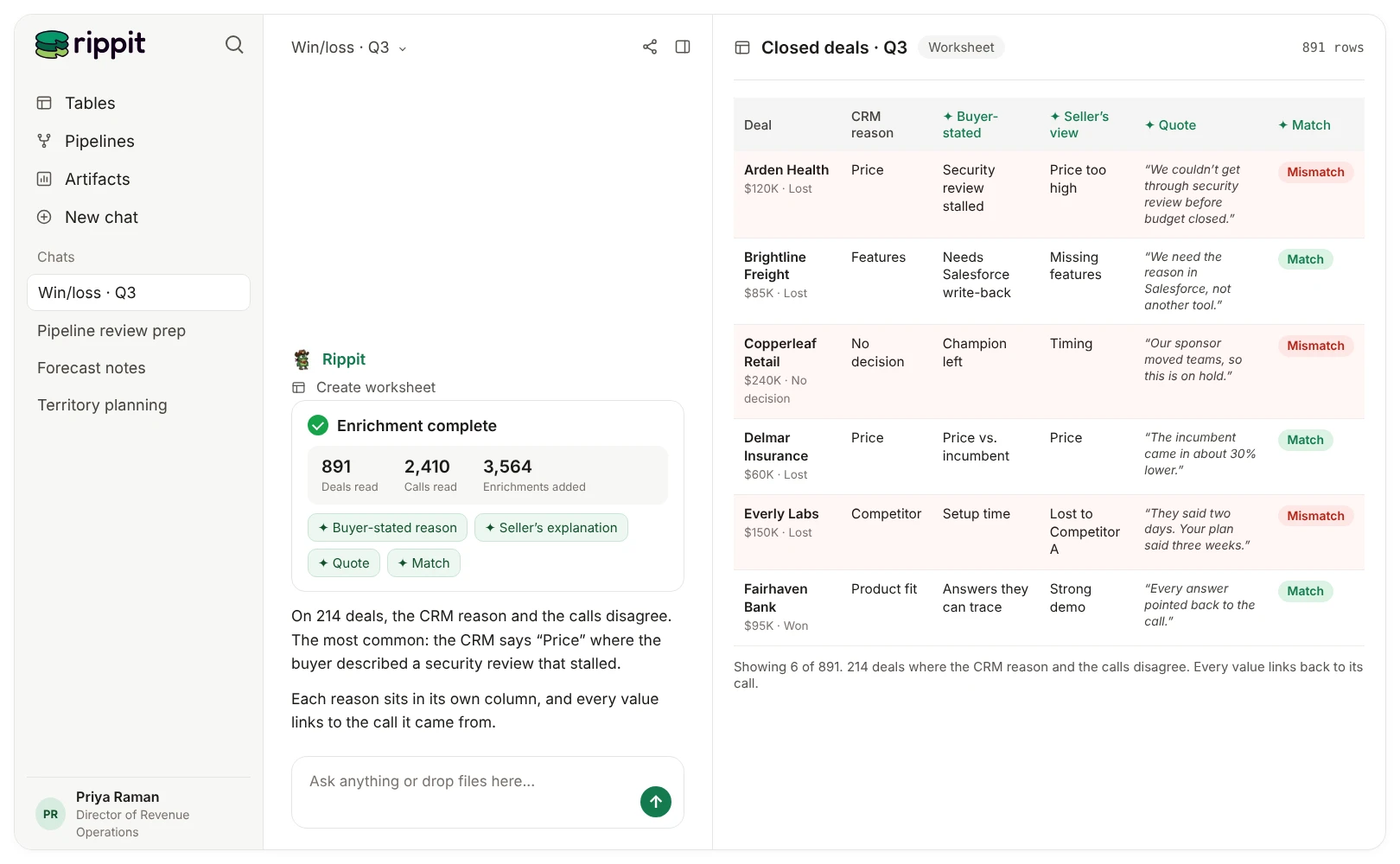
Keep evidence spans and allow multiple reasons. Version the taxonomy when products, competitors, pricing or selling motions change.
In Rippit: Each reason is its own enrichment column: a choice list for the buyer-stated reason (with an “unclear” option), one for the seller’s explanation, and a text column for the quote behind it.
Step 4: Compare like with like
Useful analyses include reason prevalence within comparable populations, sequence and stage of objections, differences in buyer and seller explanations, and changes over time.
Control or stratify by segment, product, stage, region, seller, time period and conversation coverage where material. Report counts and uncertainty. Do not turn association into causal lift.
Step 5: Review findings with people
Sales and product marketing should review high-impact findings, contradictory evidence and taxonomy changes. A small number of win/loss interviews may reveal missing reasons or correct misleading call interpretations.
The agent should help select cases and assemble evidence, not replace direct customer research.
Step 6: Turn it into a weekly agent
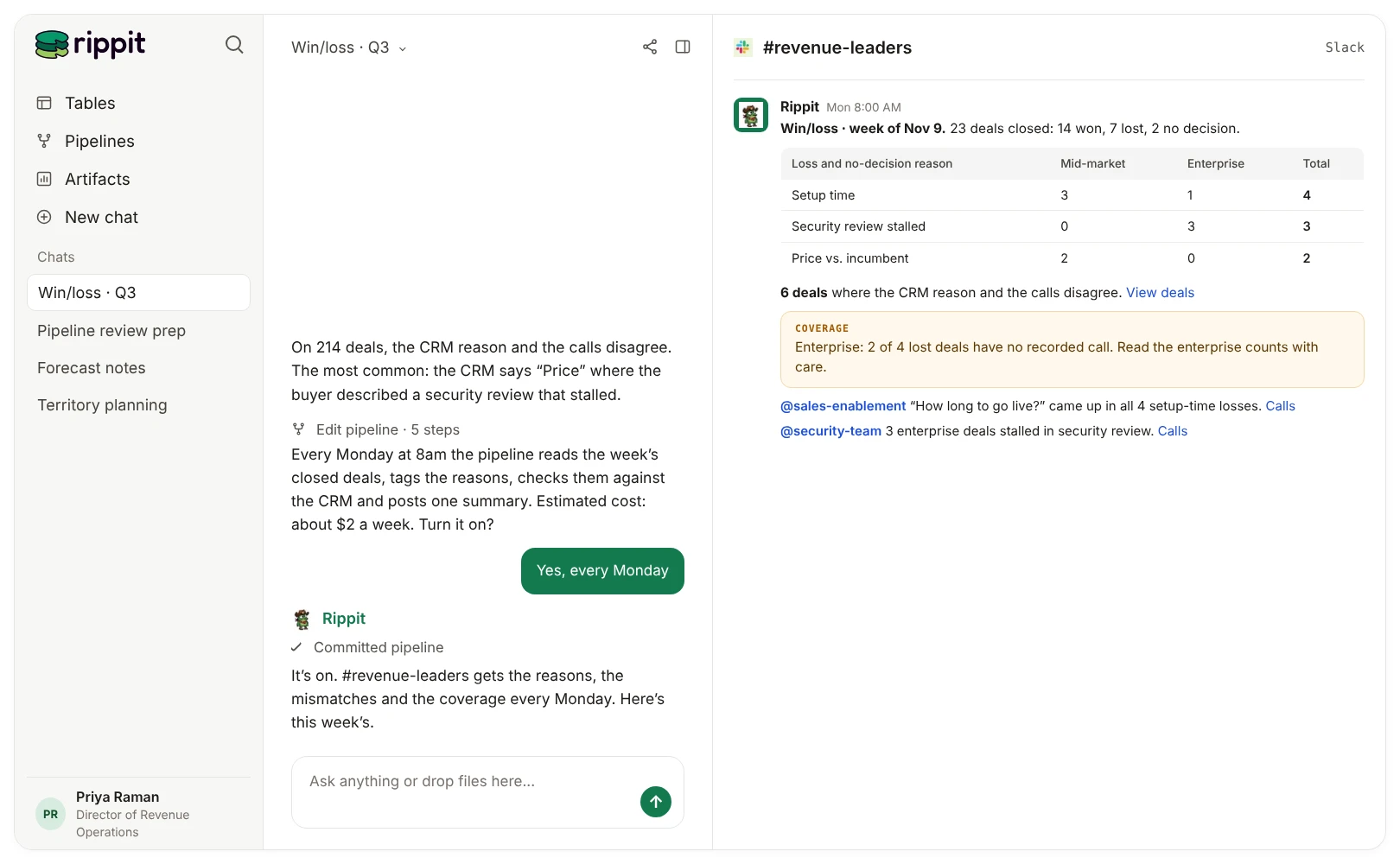
Run a regular synthesis plus event-based reviews for launches, packaging changes or competitor moves. Route findings to named sales, product, marketing or pricing owners. Track accepted findings, decisions, taxonomy corrections and later evidence.
In Rippit: Describe the whole job in one message:
Ask Rippit
Every Monday at 8am, for deals that closed last week, tag the buyer-stated reason, the seller’s explanation and any competitor named on the calls. Compare them with the CRM loss reason. Post one summary to #revenue-leaders with counts by segment, the deals where the CRM reason and the calls disagree, and links to the calls. If nothing closed, say so.
Rippit builds it as a draft. Test it on a sample and check the cost before you put it live.
Where does Rippit fit, and where doesn’t it?
Rippit reads every call and deal and keeps the analysis running. It doesn’t replace your CRM, your buyers or your judgment.
Rippit brings in sales calls from Gong and other call recorders, Salesforce opportunities as tables, and research on competitors. It adds the reason columns your CRM doesn’t have and keeps the analysis running as a weekly pipeline. Every value links back to the call or record behind it.
Where it doesn’t fit: it won’t tell you that a reason caused a loss, it doesn’t replace talking to buyers, and writing reasons back to Salesforce needs a custom MCP connection. Treat the output as a consistent analytical model, not an unquestionable account of why a buyer decided.
Which agents should you run next?
Start from the ready-made version, then connect the findings to positioning and competitors.
- Win/Loss Analysis Agent: the ready-made version of this playbook, with a weekly brief to Slack or Google Docs.
- How to find a positioning angle your competitors aren’t claiming: turn your loss reasons into a positioning gap.
- How to track competitor mentions across your deals, calls and support conversations: add the competitor side.
- Market Positioning Agent: take the findings to page copy.
Frequently asked questions
How is a win/loss agent different from the loss reason in my CRM?
The CRM field is the rep’s pick from a dropdown. A win/loss agent adds what the buyer actually said on calls as its own column, and flags deals where the two disagree.
How many deals do I need?
There is no fixed number. You need enough closed deals per segment to compare, with the counts and call coverage reported next to every finding.
Can I write the reason back to Salesforce?
Rippit keeps the reasons as columns in Rippit. Writing them back to your CRM needs a custom MCP connection.
Can’t I just ask Claude or ChatGPT why we lose deals?
Keep using them. On their own, they read only the calls and records they can reach in one chat. Connected to Rippit through our MCP server, they work from every closed deal, with the same reason columns every time.
Do I still need win/loss interviews?
Yes, a few. A small number of interviews can reveal reasons the calls miss or correct a misleading reading of a call.
What is Rippit?
Rippit is a Growth Data Platform that helps you and your team build your edge. Anyone can build AI agents on all of their customer and business data, with no engineer needed. Bring together what buyers, customers and competitors say, and keep the analysis running for your team, in Rippit or in your own AI assistant through our MCP server.
For this agent
- Reads
- Gong sales calls matched to closed Salesforce opportunities
- Adds
- Competitor pages and market context through web research
- Delivers
- A weekly win/loss summary for revenue leaders in Slack, with loss reasons by segment and links to the calls
Build your first agent on your own customer and business data.
Start free with $10 in credits. No credit card or engineer needed.
Keep reading
More from the Rippit Library.
How to Build a Message Performance Agent From Sales Calls and Deal Outcomes
Build an agent that tracks the claims your team makes on sales calls, how buyers react and what happens to the deal, without mistaking a pattern for proof.
How to Find a Positioning Angle Your Competitors Aren’t Claiming
Use buyer conversations, support evidence and competitor research to find a positioning angle competitors aren’t claiming, then test whether it’s true, important and ownable.
The Growth Data Your AI Agent Needs Doesn’t Exist Yet
Why AI agents can’t find the judgments growth decisions depend on, and how to create them once as data every team can use.