An AI agent’s conversations reveal knowledge gaps when the same pattern repeats: questions it can’t answer, answers it can’t find, stale or conflicting policies, missing account context and workflows that dead-end. Count each pattern across every conversation, check the evidence and rule out other explanations before you decide what to fix and who owns it.
Every AI-agent conversation is also a record of what the agent knew, what it could access and where its instructions stopped being useful.
A handoff is not automatically a failure. Neither is a repeat question. But when the same pattern appears across many conversations, it can reveal a gap in knowledge, policy, product design, permissions or workflow.
The fifteen patterns below are questions to investigate, not prevalence claims. Count them in your own data, inspect the underlying evidence and rule out alternative explanations before deciding what to fix.
Key takeaways
- Patterns matter more than single conversations. One handoff is noise; the same handoff a hundred times is a gap.
- Many “knowledge” gaps are access gaps. The agent may know the rule but can’t see the account fields to apply it.
- Check the alternative explanation first. Policies change, plans differ and customers switch channels.
- Rank gaps by consequence, not frequency. A rare wrong answer about data access can matter more than a common harmless one.
- Give every gap an owner in knowledge, policy, product or agent setup, and test the fix before you expand it.
What are the 15 gaps at a glance?
The fifteen fall into four groups: missing knowledge, missing context, broken workflows and misunderstood language.
| Gap | What to look for | Likely owner |
|---|---|---|
| 1. Questions it can’t answer | The same question ending in a fallback or handoff | Help center |
| 2. Answers it can’t find | “I don’t know” when a current article covers it | Agent setup |
| 3. Contradictory policies | Different answers to the same policy question | Policy |
| 4. Missing eligibility rules | Can’t say whether a customer qualifies | Policy or agent setup |
| 5. Localization gaps | More handoffs or vaguer answers in one language | Help center |
| 6. Stale knowledge | Old steps, names, prices or screens | Help center |
| 7. Workflow dead ends | Steps that end at a missing screen or option | Product |
| 8. Unstated prerequisites | A setup answer that skips a required step | Help center |
| 9. Customer language it misreads | A colloquial or old name mapped to the wrong feature | Product marketing |
| 10. Generic answers | General advice where a precise rule exists | Help center |
| 11. Conflicts with human macros | AI and approved human replies disagree | Support operations |
| 12. Permission questions without context | Answers that don’t match the account’s setup | Agent setup |
| 13. Unclear escalation paths | A correct “no” with no next step | Support operations |
| 14. Unsupported capability claims | Promises the documentation doesn’t show | Agent setup |
| 15. Repeat contacts | The same customer back on the same topic | Product or support |
1. Questions the agent repeatedly cannot answer
Look for the same question, phrased in different ways, ending in a fallback response or human handoff.
The likely gap may be missing documentation, but first confirm that the question is actually in scope. The customer may be asking for an account-specific action the agent is not permitted to take.
2. Answers that exist but are not retrieved
The agent says it does not know, even though a current help article covers the question.
That can point to retrieval configuration, source indexing or unclear article language. It can also happen because the article applies to a different plan, product version or region.
3. Contradictory policies
The agent gives different answers to the same policy question, or its answer conflicts with a published policy or approved human response.
Before calling it a knowledge problem, check whether the policy changed during the period or legitimately differs by region, plan or customer type.
4. Missing eligibility rules
Customers ask whether they qualify for a refund, credit, upgrade, exception or feature, and the agent cannot apply a clear rule.
Sometimes the rule is missing. Sometimes the agent simply cannot see the account fields required to apply it. Those are different fixes.
5. Localization gaps
Questions in one language are answered in another language, answered less precisely or handed off more often.
Compare enough conversations to separate a real language gap from a small or unusually difficult sample.
6. Stale knowledge
The agent cites old steps, product names, prices, limits or screens that customers say no longer match what they see.
The source may be stale, or the agent may be retrieving an older source it should no longer use. Preserve the cited evidence so the owner can tell which one happened.
7. Workflow dead ends
The agent sends a customer through steps that end at a missing screen, unavailable option or permission the customer does not have.
This may be a product or UX problem, but it can also mean the instructions failed to account for the customer’s role or plan.
8. Prerequisites that were never stated
A setup answer skips a required connection, permission or configuration step, and the customer returns with the same problem.
Check whether the prerequisite was genuinely omitted or whether the customer did not complete a step that was provided.
9. Customer language the agent does not understand
Customers use a colloquial name, old product name or outcome-oriented phrase that the agent maps to the wrong feature.
Product marketing and documentation teams can use these patterns to build a shared glossary, but only after confirming that customers mean the same thing by the phrase.
10. Generic answers where a precise rule exists
The agent provides general advice when the customer needs a specific limit, policy, sequence or requirement.
This is especially important when the generic answer sounds useful but cannot help the customer make the next decision.
11. Conflicts with human macros or saved replies
The agent’s answer differs from the approved response a human agent would use for the same situation.
Do not automatically assume the AI answer is wrong. The human macro may itself be stale, overly broad or intended for a different customer population.
12. Permission questions without account context
Customers ask who can view or change data, and the agent gives an answer that does not match the account’s configuration.
The fix may require better documentation, access to the correct account fields or a safer boundary that routes configuration-specific questions to an administrator.
13. Unclear escalation paths
The agent correctly declines to act but does not explain how the customer can reach a person, what information to provide or what happens next.
The boundary may be working exactly as designed. The gap is the handoff experience. For how to classify each handoff by root cause, see how to audit AI chatbot escalations.
14. Capability claims the documentation cannot support
The agent promises a feature, integration, timeline or result that current product documentation does not show.
Preserve the exact answer and source. The problem may be hallucination, an outdated source or an approved capability that has not yet been documented. For a fuller taxonomy of wrong answers, see how to catch the wrong answers your AI agent gives customers.
15. Repeat contacts after an agent answer
The same customer returns on the same topic soon after receiving an answer.
That can indicate an incomplete answer, an unsuccessful workflow or unresolved product problem. It can also mean the customer wanted a different outcome or switched channels after the issue had already been resolved.
How do you find these gaps across every conversation?
Start from the business question, let Rippit build the classifications and joins, and keep the result running every week.
Do not begin by creating fifteen columns manually. Start with the business question: “Where does our AI agent lack the knowledge, context or workflow needed to resolve a customer’s request?”
In Rippit: Connect your AI agent platform, such as Decagon, Ada or Sierra, or your helpdesk. Rippit works backward from the question: it finds the relevant conversations, adds AI columns for each gap and keeps every value linked to the conversation behind it.
Ask Rippit
For every AI agent conversation last month that ended in a handoff, a fallback or a repeat contact, tag the knowledge gap type, the customer’s question, the agent’s answer and the help article it should have used. Group them by likely owner.
A useful output includes:
- the knowledge-gap category;
- the customer’s question;
- the agent’s answer;
- whether a human became involved;
- whether the customer returned on the same topic;
- the source or policy the agent should have used;
- the likely owner;
- the alternative explanation a reviewer should rule out.
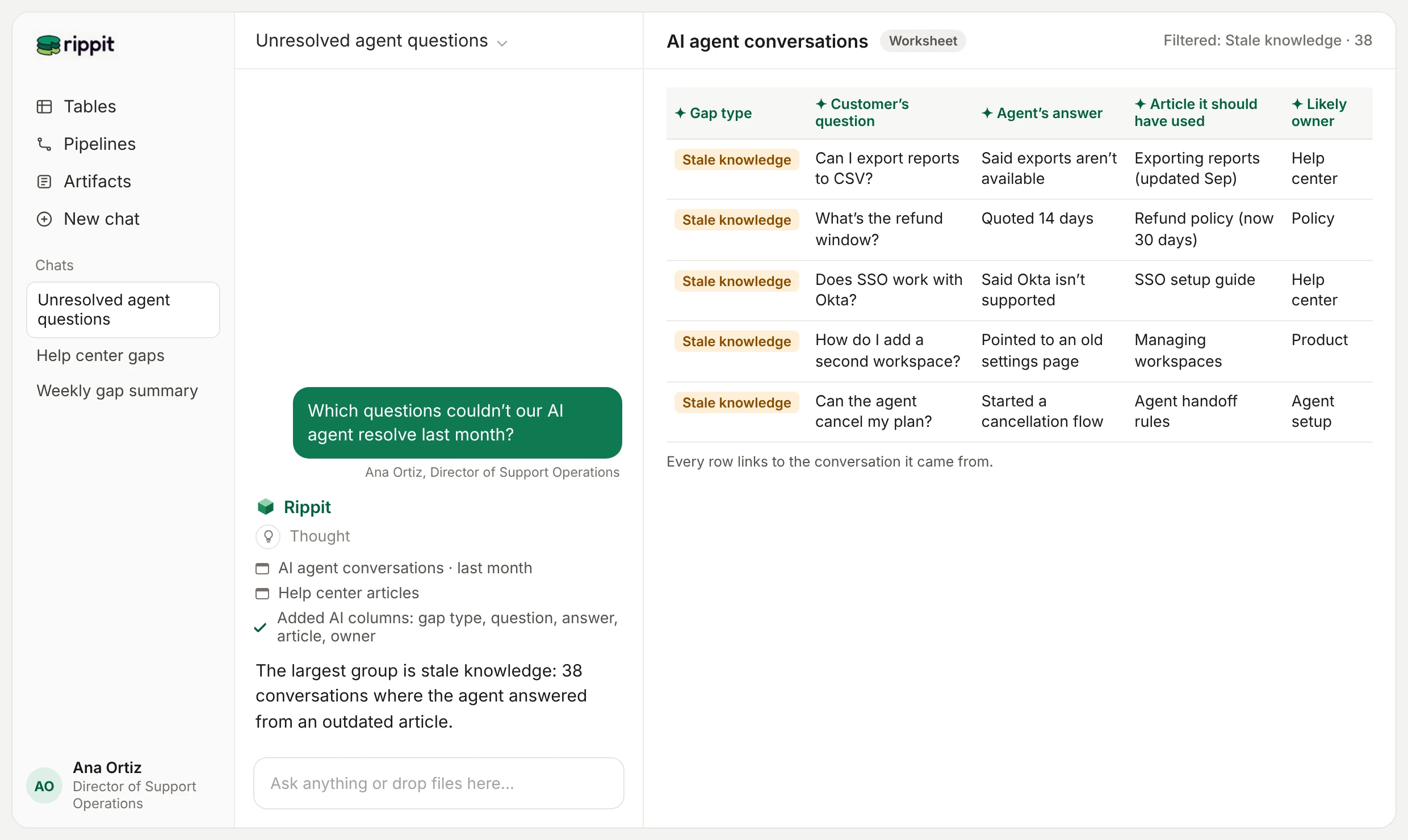
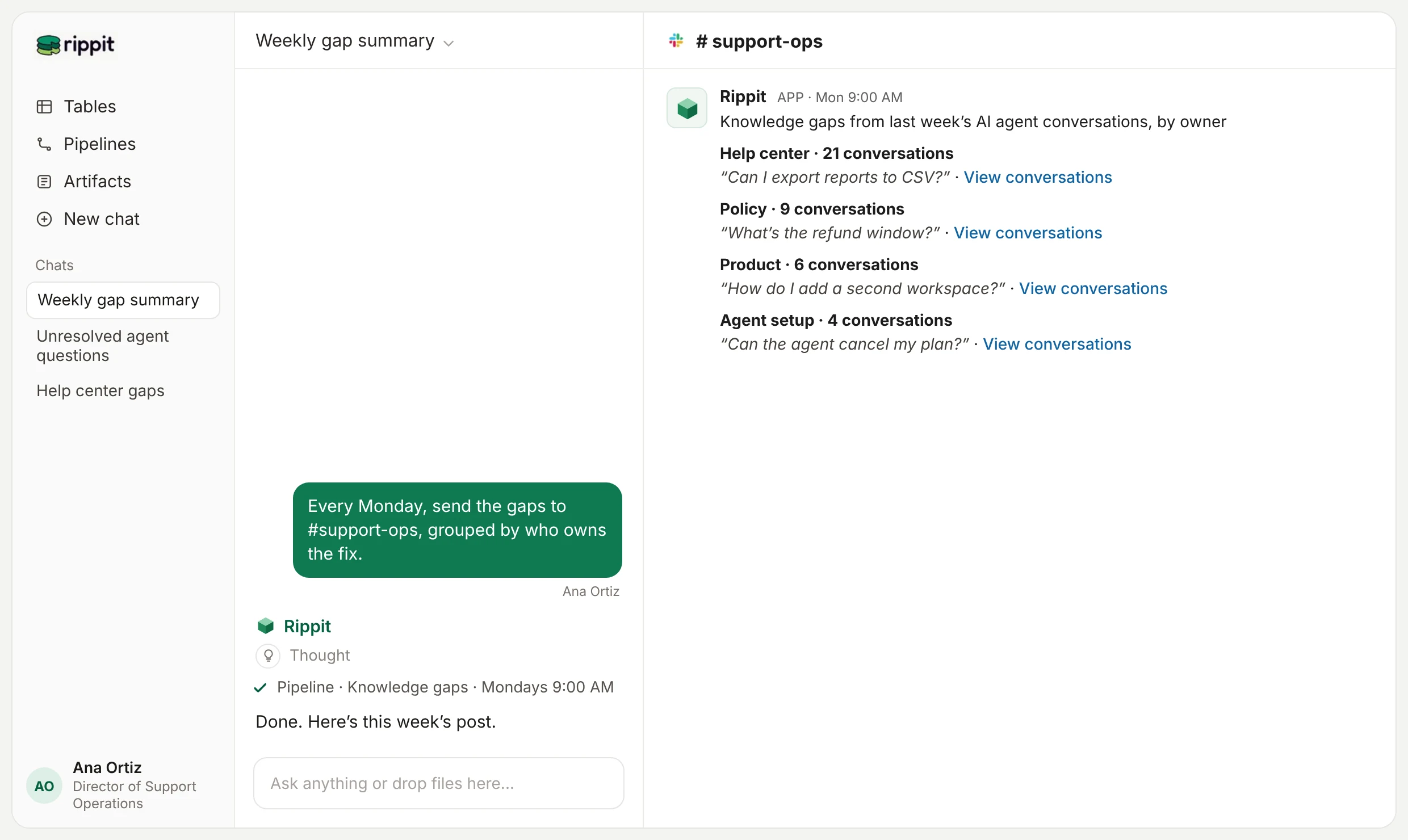
Once the analysis is reliable, a scheduled pipeline can check new conversations and send a recurring review to the people who own knowledge, policy, product and agent configuration. The ready-made version is the In-App Chat Insights agent.
How should you prioritize the gaps?
Rank each gap by what it costs the customer and the business, not by how often it appears.
The most common gap is not always the most important. Add context such as:
- customer segment or account value;
- whether the question blocked a purchase or renewal;
- whether the answer created security, legal or policy risk;
- whether the gap caused repeated contacts;
- whether the issue affected one channel or every channel;
- how confident reviewers are in the classification.
A question asked twice may deserve immediate attention if the wrong answer exposes customer data. A question asked two hundred times may be harmless if the agent’s handoff is fast and intentional.
In Rippit: A lookup adds the account’s plan, value and renewal date from Salesforce or your warehouse to each conversation, so a gap that blocks renewals rises to the top.
Who should own the fixes?
A person on the knowledge, policy, product or agent team owns each recurring gap and approves every change.
An automated finding should route work; it should not silently rewrite policies or publish new customer-facing instructions. Give each recurring gap an owner, preserve reviewer corrections and test the updated behavior before expanding it.
The goal is not to punish an agent for what it cannot do. It is to use the agent’s own conversations as a continuously updated map of what your company still needs to teach, clarify, connect or fix. To check whether the fixes work, measure what your AI agent actually resolves.
Frequently asked questions
Are handoffs evidence that an AI agent failed?
No. Some handoffs are required by design. Look for avoidable handoffs, unclear next steps or repeated patterns that suggest missing knowledge or context.
How many conversations should we review?
Use the full population of agent conversations when you need reliable counts or trends, then read a sample of the underlying evidence. A small sample is useful for discovery but cannot establish how common a gap is.
Can Rippit automatically fix the knowledge base?
No. Rippit finds and organizes the evidence and can draft a summary for the owner. Changes to customer-facing knowledge, policies and external systems follow the permissions and approval process your team defines.
What is the first knowledge gap to investigate?
Start with a problem your team already suspects: repeated unanswered questions, stale instructions or customers returning after an agent answer. Validate the pattern, its consequence and its likely owner before expanding the taxonomy.
What is Rippit?
Rippit is a Growth Data Platform that helps you and your team build your edge. Anyone can build AI agents on all of their customer and business data, with no engineer needed. Read every AI agent conversation alongside your help center, CRM and product data, and route each gap to the team that owns the fix. Keep the analysis running for your team, in Rippit or in the AI assistant you already use through our MCP server.
For this agent
- Reads
- AI agent conversations from your AI agent platform, such as Decagon, alongside your help center articles
- Joins
- Salesforce accounts and product data, so each gap shows who it affects
- Delivers
- A weekly Slack summary for Support Operations, with gaps grouped by the team that owns the fix and links to the conversations
Build your first agent on your own customer and business data.
Start free with $10 in credits. No credit card or engineer needed.
Keep reading
More from the Rippit Library.
Revenue Intelligence vs. a Growth Data Platform: Different Questions, Different Data
Revenue intelligence runs sales execution on calls and CRM data. A Growth Data Platform gives every team and its AI agents shared findings. When to use each.
Know What Your AI Agent Tells Customers
Score every bot conversation, trace each failure to its cause, and route the fix, from accuracy to handoffs.
Find Out Why Your Chatbot Hands Customers Off
Code every escalation by root cause, score the handoff, and separate avoidable escalations from the right calls.